ZLG API (zlgcan.dll)
zlgcan.dll is ZLG's unified Windows communication library supporting both Classic CAN and CAN FD interfaces, including CANmeleon devices running USBCANFD-200U/400U, USBCAN-2E-U, or USBCAN-II firmware. Official SDK packages include headers, libraries, and sample projects for C/C++, C#, LabVIEW, and Python.
Library Setup and Runtime Requirements
zlgcan.dll is distributed as a Windows dynamic-link library (x86 and x64) providing functions to open devices, configure bitrates, initialize and start channels, transmit and receive frames, and close devices.
Because zlgcan.dll is built with Microsoft Visual Studio 2008, ensure the Microsoft Visual C++ 2008 Redistributable matching your application's architecture (x86 or x64) is installed on the target Windows machine before loading the library.
Typical API Call Sequence
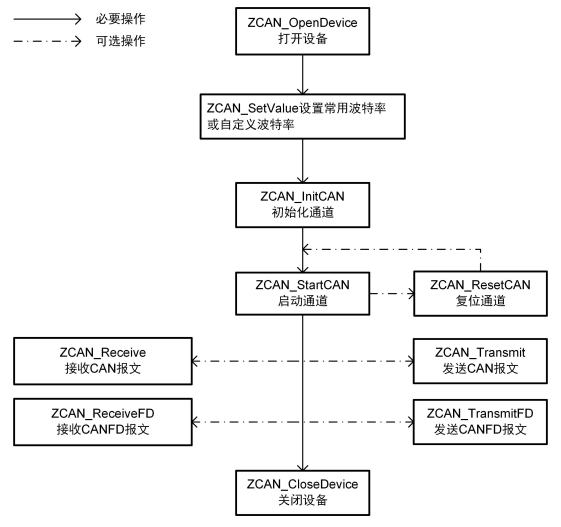
Follow ZLG's standard zlgcan call sequence when opening and operating a CAN or CAN FD channel:
- Open device (
ZCAN_OpenDevice) — obtain a device handle for the selected device type and index. - Set channel properties / bitrates (
ZCAN_SetValue) — configure standard or custom arbitration-phase and data-phase bitrates viaIPropertyorZCAN_SetValue. - Initialize channel (
ZCAN_InitCAN) — initialize the target CAN / CAN FD channel and obtain a channel handle. - Start channel (
ZCAN_StartCAN) — bring the channel online (optionally callZCAN_ResetCANto reset the channel before restarting). - Transmit and receive frames:
- Classic CAN:
ZCAN_TransmitandZCAN_Receive - CAN FD:
ZCAN_TransmitFDandZCAN_ReceiveFD
- Classic CAN:
- Close device (
ZCAN_CloseDevice) — release the device handle before exiting.